
Update: Umano has been purchased by Dropbox and subsequently shut down. There is no direct replacement to what Umano was providing but Audible
I have been using Umano since August 2014 and it is by far the most used app on my phone.
The service allows you to listen to narrated blog posts and articles. It is free to use for a limited time every day and the Premium version costs $3.99 per month.
There is so much to read every day, e-mails, documentation, researching, I just don’t have the time or willingness to read anything else. Umano allows me to listen to beautifully narrated articles from areas of interest to me, while driving, flying, waiting to pick up my daughter from tennis practice or even falling asleep.
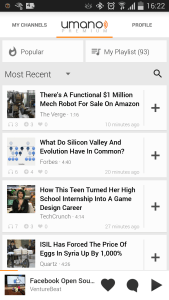
I use Umano service on my Android phone and very rarely on their website. Unfortunately, both the Android app and the website has a lot of shortcomings, it is hard to use and not intuitive in every aspect the word intuitive might imply. Yet, it is by far the most used app on my phone and I just love it.
In general, the look and feel of the user interface are fine but it lacks much-needed features and feels clumsy, at least the way I use the app. Earlier versions of the app and website had an even more disconnected feel, “Am I logged into my account?” or “Where are my settings?” type feeling out of place, and some of those have since improved with later versions, but general use continues to lack important features. There is a playlist to save articles to, but no way to create multiple playlists. There is a way to listen in 0.5x, 1.0x and 2.0x speeds, but these all require a different version of the sound files to be downloaded. There is a concept of un-listened (bold) and listened articles, but there is no way to un-listen an article, as in marking a mail unread in your Inbox. You can swipe right to remove an article from your playlist, but the same action doesn’t work on your main list and there is no way to get rid of a suggested article from your main list. When listening to an article, there is no way to go back or forward few seconds without using the dial with your finger, which a small movement obviously goes back a few seconds when listening to a short article and minutes when listening to a long article.

Over time my use of the service changed and I developed a certain way of using the app, finding ways to overcome some of the missing features and coming up with new wish lists. In its current form, the app almost feels like it was designed for people who are looking to stumble upon things to listen to on their free time. I, on the other hand, use Umano exclusively to keep track of what is going on in the world, as my main news source and probably have the desire to use it like my Inbox. The developers need to go out of the box and look into use cases that they themselves may not have envisioned.
At first, I was listening to articles as they came in and saving the ones that I liked to my Playlist. After couple months of use I realized I was going over my limited data plan, Umano probably uses high-quality sound files and they add up. It should not be too hard to offer sound files in different qualities, but that option is missing as well. So I changed how I select which articles to listen to by adding them to my Playlist ahead of time, which makes the app download them, giving me the ability to select “sync only on WiFi” mode and saving data usage on my phone. This method of saving articles ahead of time also allows me to listen to them while on a flight or outside of coverage. I don’t use the speed up or down options to change the rate of play as I am in the “don’t use mobile data” state of mind and these options are not handled by the client. I use the service mostly while on the road, driving, and usually find myself frustrated for not having the ability to categorize or mark articles any further than the only playlist, which I already use as the sole location to start my listening from. For this, I added Pocket to the mix. I start listing an article from the Playlist, and right after it starts I select “Remove from Playlist” as when it auto continues to the next article, I don’t want this one to continue to remain in the Playlist. If I want to skip this article, I click next and repeat the process with the next article. If I want to save the article, I click on the share option and select Pocket where I further tag the article as “new” for later re-listening/reading and in-depth analysis, or any number of other tags I made up along the way like “productivity”, “management”, “health”, “childcare”, etc.
Umano may have a lot of shortcomings, but the reality is, in very short time they have created a service that I cannot live without, that I feel very passionate about (hence this post), and hope that it is wildly successful. I have been a distant observer of Audible for a long time, thinking that it might be a good idea, but never using it or even trying the service out as I didn’t want to waste my free book by registering. Umano created a service that fixes such a big problem in my life and opened my eyes to other possibilities that I recently signed up for Audible and started listening to books. On that note, the Audible app might have a lot of clues for Umano developers for improving their application. Bookmarks anyone?
Driving is no longer a waste of time for me, it is the time I unwind, listen to familiar voices and learn new things.
Update February 11, 2015:
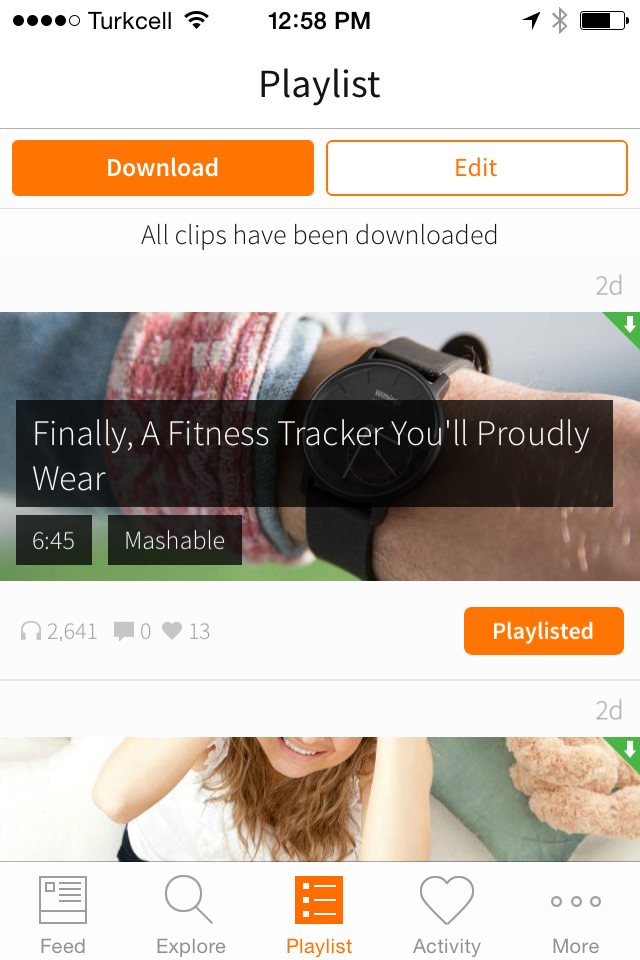
I changed my phone recently and while the old one was gone and I was waiting for the new one to arrive, I borrowed an iPhone5 from a friend. I can say that, for the way I use Umano, the experience is even worse on iOS. I constantly felt lost, not knowing which articles I already listened to, which articles have already downloaded the sound files and which ones did not. While I was struggling with all that an update arrived, causing some excitement, which quickly turned into more disappointment. With the latest update, Umano changed the way articles are listed throughout the application, adding a picture background and putting the title in white on top of that image, with a darker background. Now it is plain impossible to distinguish between listened and not-listened articles. When making such a change, why would the developers not add a simple option to select between the new tile display and the old list display is beyond me. The same update arrived on Android as well, which seems to be more proof that I am an outlier and nobody else is using the app like the way I do. I hope I am the outlier as the alternative means Umano developers are out of touch with reality! Regardless, Umano continues to be the most used app on my phone…
 Mehmet Tolga Avcioglu